CSV Editor

1000万行以上でも、
軽い。
10M+ Rows.
Always Fast.

1,000万行を超えるCSVファイルを、遅延ゼロで編集できる高性能CSVエディタ。
EC運営やデータ解析にこれ一本。

Handle 10M+ row CSV files with zero lag.
One app for e-commerce ops and data analysis.

Windows 配信中 Available on Windows macOS 近日公開 macOS — Coming Soon Ubuntu 近日公開 Ubuntu — Coming Soon

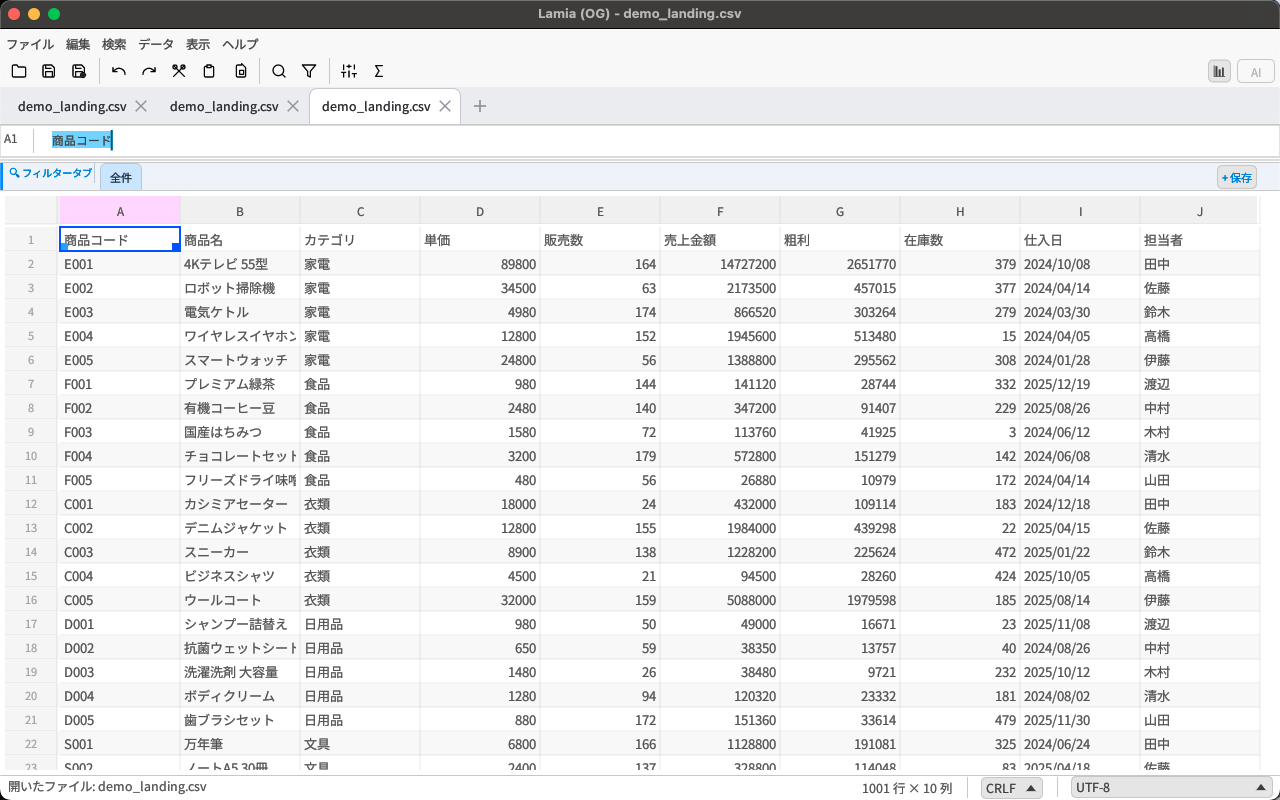
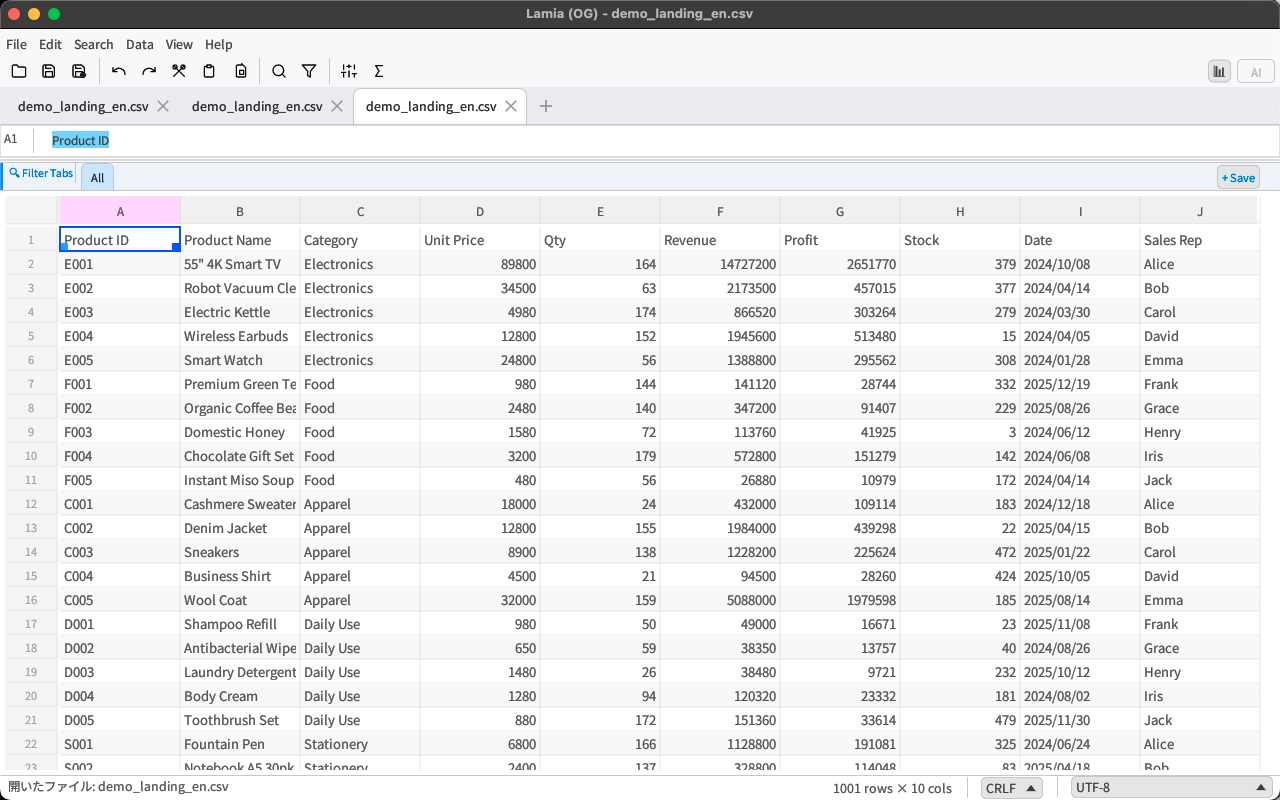
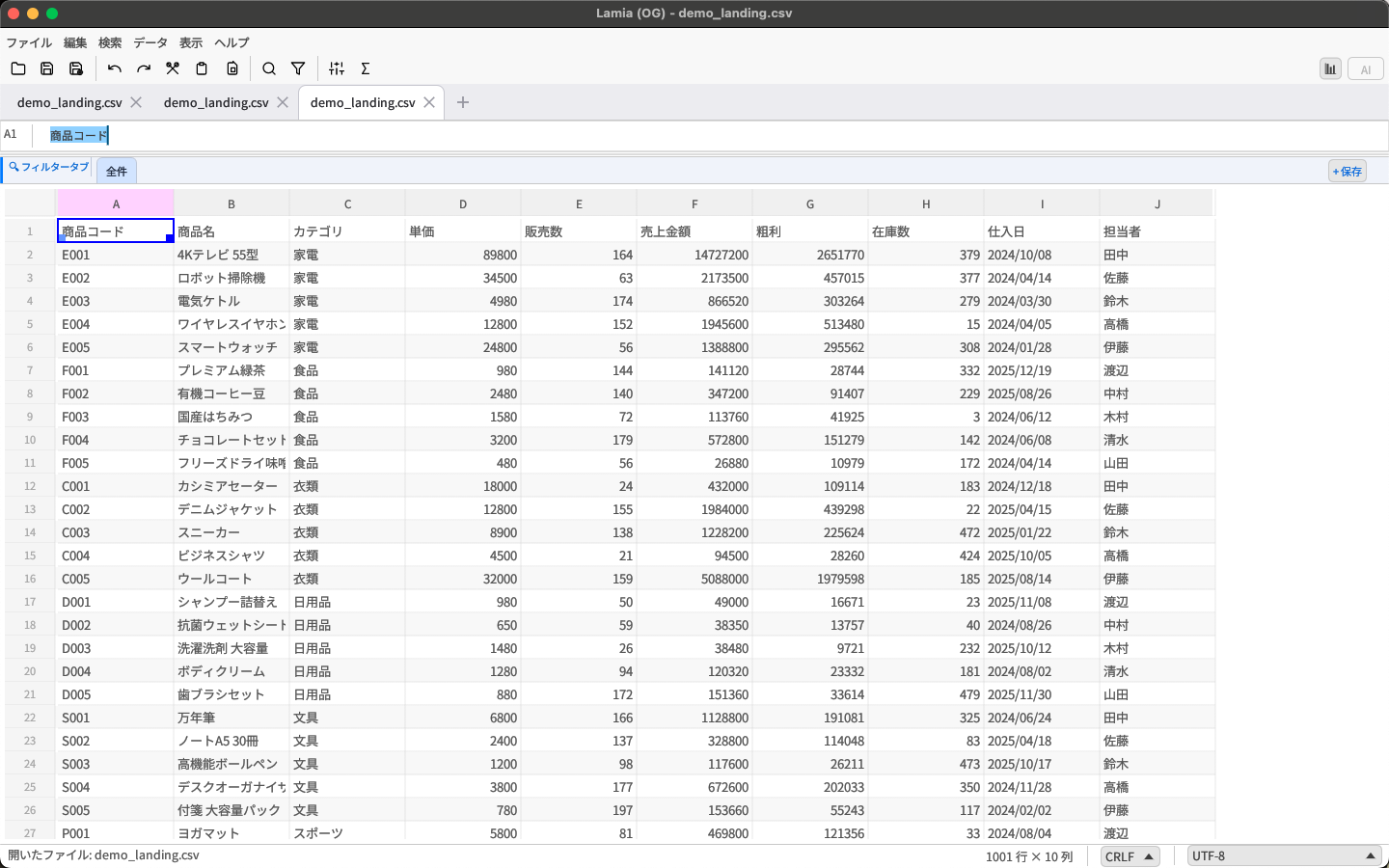
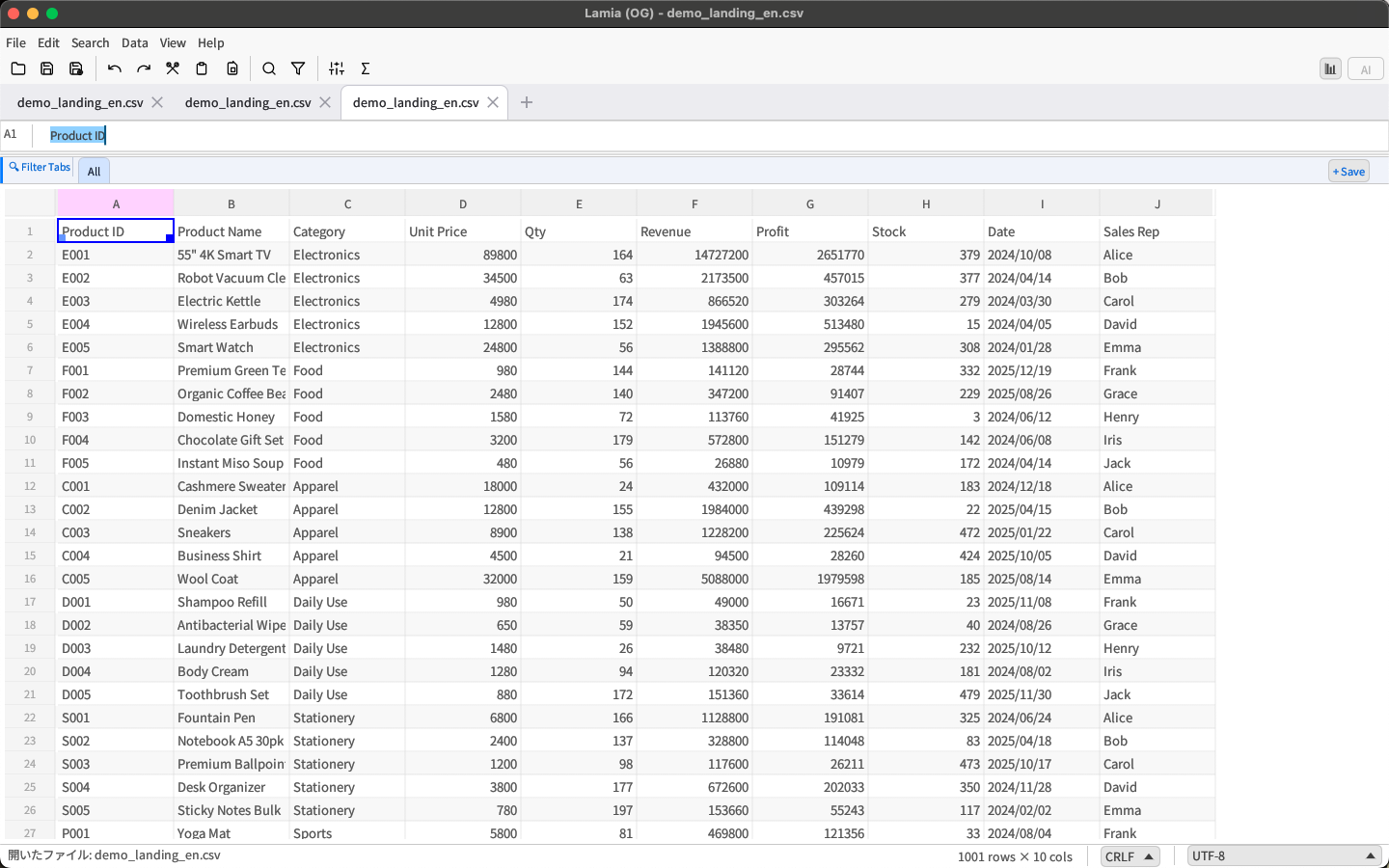
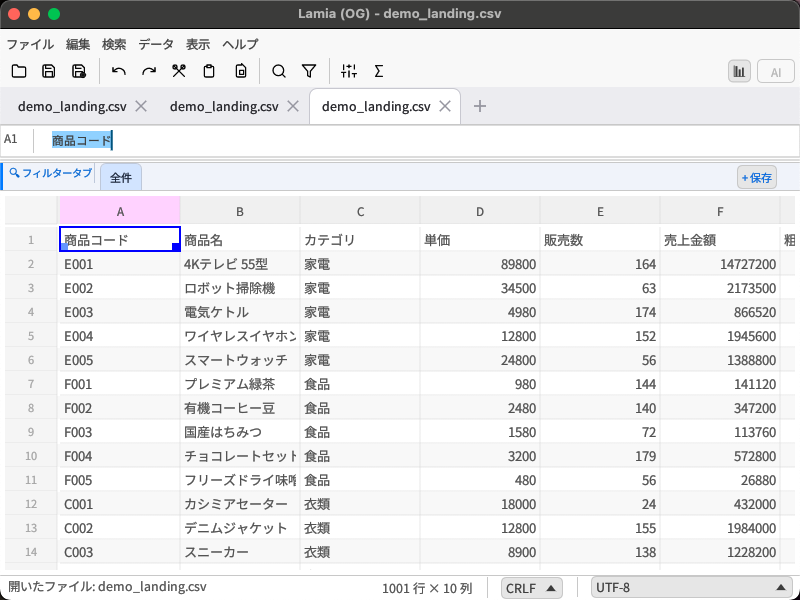
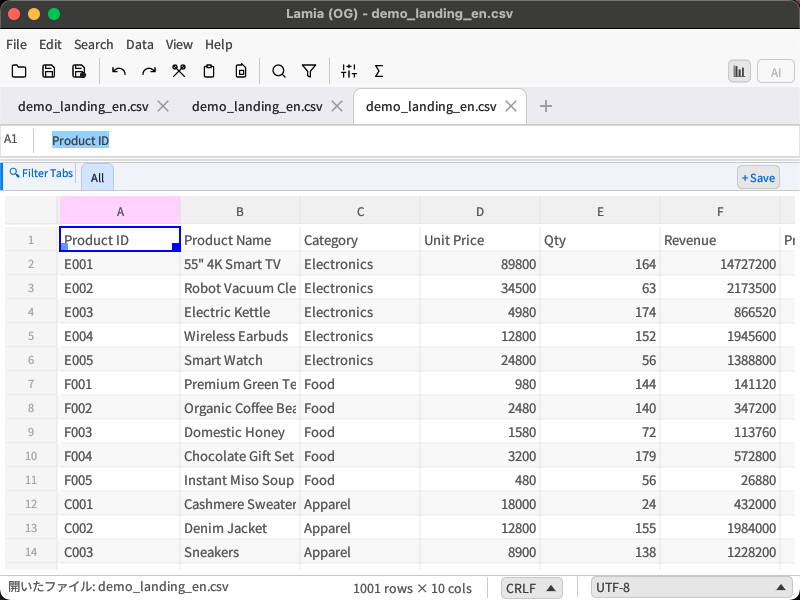
Lamia グリッド全体画面 Lamia grid main view

超高速スクロール Blazing Fast Scroll

仮想スクロールで表示領域のみ描画。1,000万行でもUIはブロックされない。

Virtual scroll renders only visible rows. 10M rows, zero UI lag.

🤖

AIチャット統合 AI Chat Integration Beta

ChatGPT・Claude・Geminiをアプリ内から直接呼び出し。データ分析をその場で完結。

Call ChatGPT, Claude, or Gemini inside the app. Analyze data on the spot.

🇯🇵

完全日本語対応 Full Japanese Support

Shift-JIS・UTF-8 BOMを自動判定。文字化けの心配なし。

Auto-detects Shift-JIS & UTF-8 BOM. No garbled characters.

📊

Excel互換数式 Excel-Compatible Formulas

SUM・VLOOKUP・MATCHなど60以上の関数に対応。クロスタブ参照も可能。

60+ functions including SUM, VLOOKUP, MATCH. Cross-tab references supported.

Performance

どんなサイズでも、
軽快に。
Any Size.
Always Fast.

  • 仮想スクロールにより表示領域(30〜50行)のみをレンダリング
  • Virtual scroll renders only the visible 30–50 rows
  • 行・列の固定(フリーズ)で複数段ヘッダーも常に表示
  • Freeze rows/columns to keep multi-row headers always visible
  • 非同期ファイルI/O — 保存中もUIがフリーズしない
  • Async file I/O — UI stays responsive while saving
  • ステータスバーに選択範囲の合計・平均・件数をリアルタイム表示
  • Status bar shows sum, average, count of selection in real time
Lamia 大規模データ表示 Lamia large-scale data view

Editing

Excelユーザーも、
すぐ使える。
Familiar
from Day One.

  • 3つの編集モード: Navigate(移動)/ Edit(追記)/ Overwrite(上書き)
  • Three editing modes: Navigate / Edit (append) / Overwrite
  • 数式バー: 長いテキストも自動高さ調整。数式は = キーで入力開始
  • Formula bar: Auto-resizes for long text. Press = to enter a formula
  • 行・列挿入: 右クリックから「上 / 下」「左 / 右」を選んで挿入
  • Row/column insert: Right-click to insert above/below or left/right
  • Fill Down / Fill Right: Ctrl+D / Ctrl+R で一括複製
  • Fill Down / Fill Right: Ctrl+D / Ctrl+R to copy across selection
  • 60以上のキーボードショートカット
  • 60+ keyboard shortcuts
Lamia 数式バー・編集画面 Lamia formula bar editing

AI

データをAIに聞ける。
アプリを出ずに。
Ask AI About Your Data.
Without Leaving the App.

  • ChatGPT(gpt-4o)・Claude・Geminiの3プロバイダーに対応
  • Supports ChatGPT (gpt-4o), Claude, and Gemini
  • CSVのヘッダー+先頭5行を自動でコンテキストとして送信
  • Auto-sends CSV headers + first 5 rows as context
  • ストリーミング表示でリアルタイムに回答が流れる
  • Streaming display shows responses in real time
  • カスタムルール(組織固有ルール)をプロンプトに追加可能
  • Custom rules can be appended to every prompt
  • パネルはリサイズ可能。作業しながらAIと対話できるレイアウト
  • Resizable panel — work and chat with AI side by side
Lamia AIチャットパネル Lamia AI chat panel

Analysis

並べ替え・絞り込み・
重複削除を、
ノーコードで。
Sort, Filter, Deduplicate.
No Code.

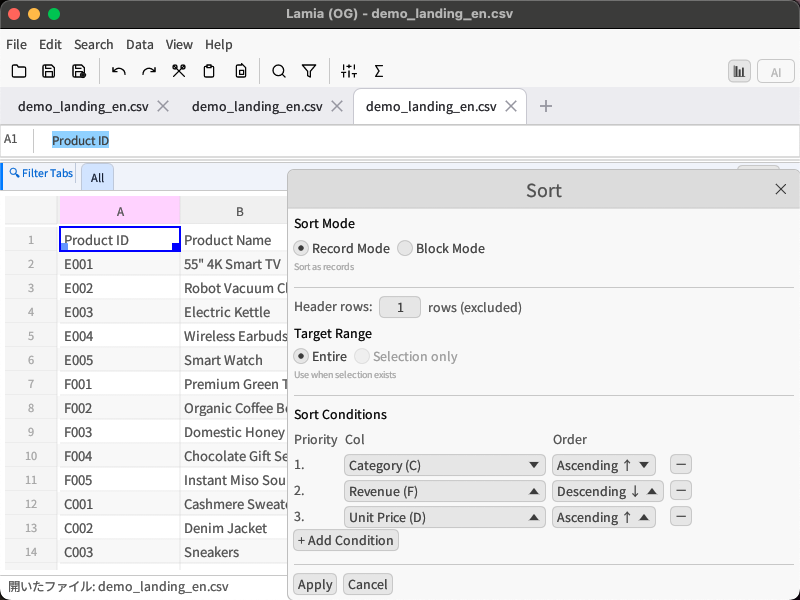
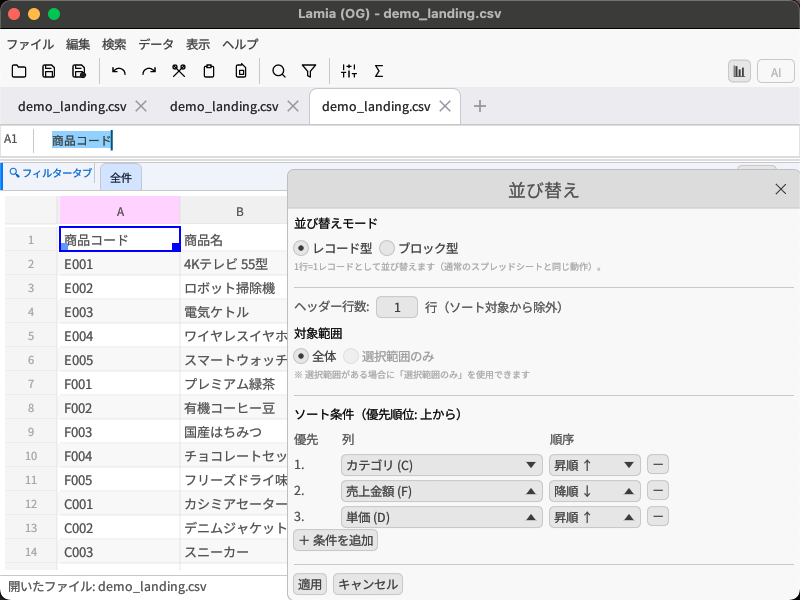
  • 多段階ソート: 最大6条件の優先順位付きソート
  • Multi-level sort: Up to 6 sort conditions with priority ordering
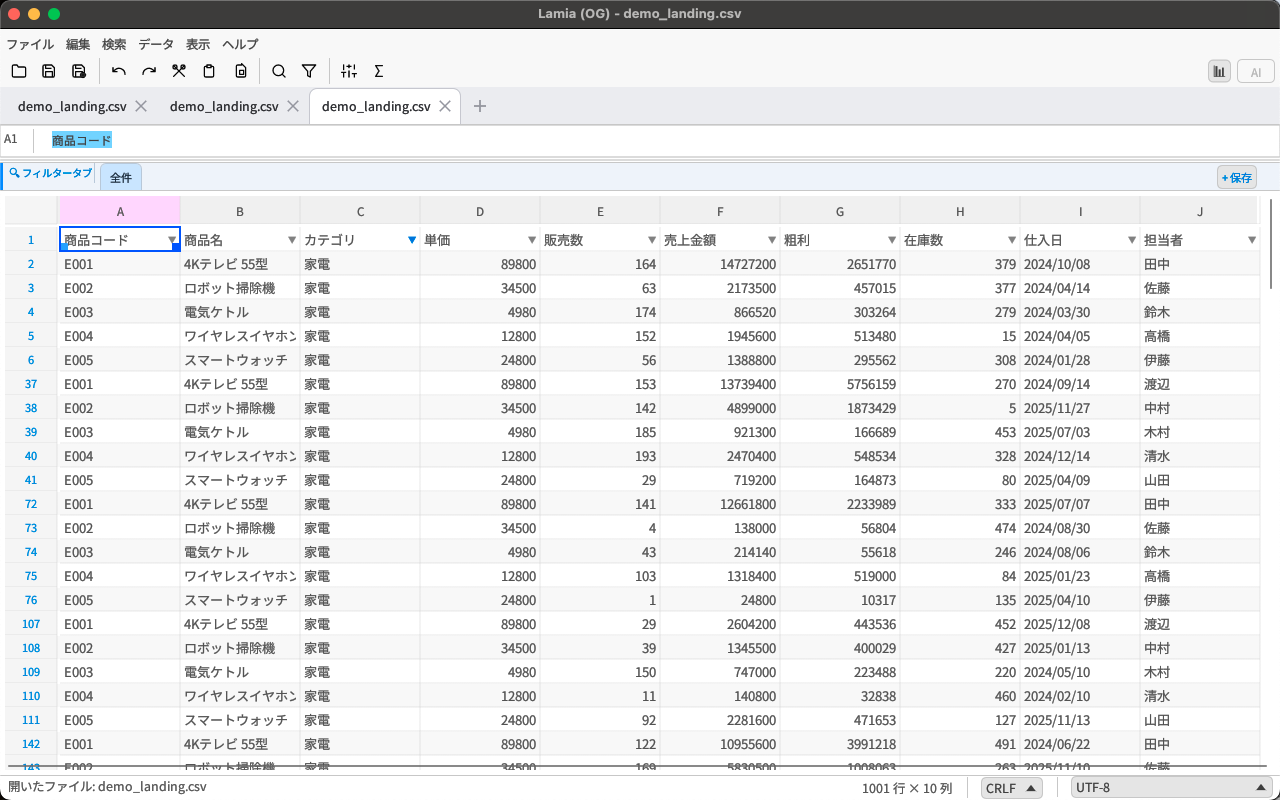
  • オートフィルター: 値リスト / テキスト / 数値 / AND・OR複合条件
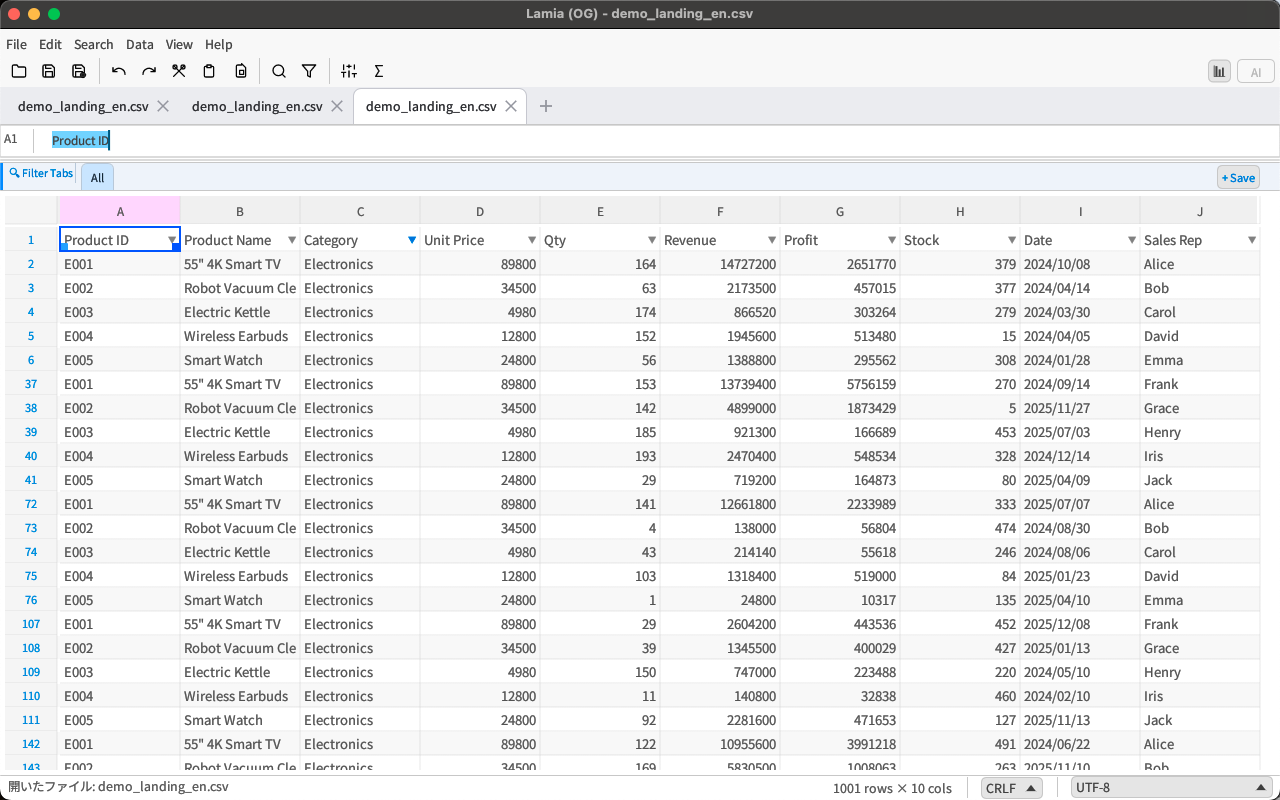
  • AutoFilter: Value list / text / numeric / AND-OR compound conditions
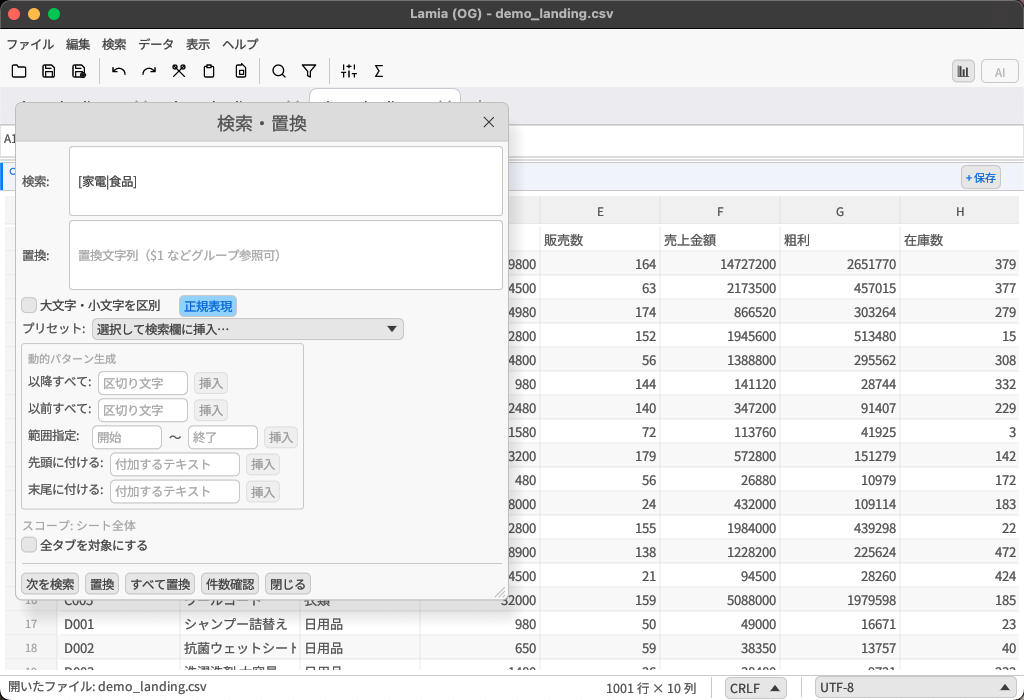
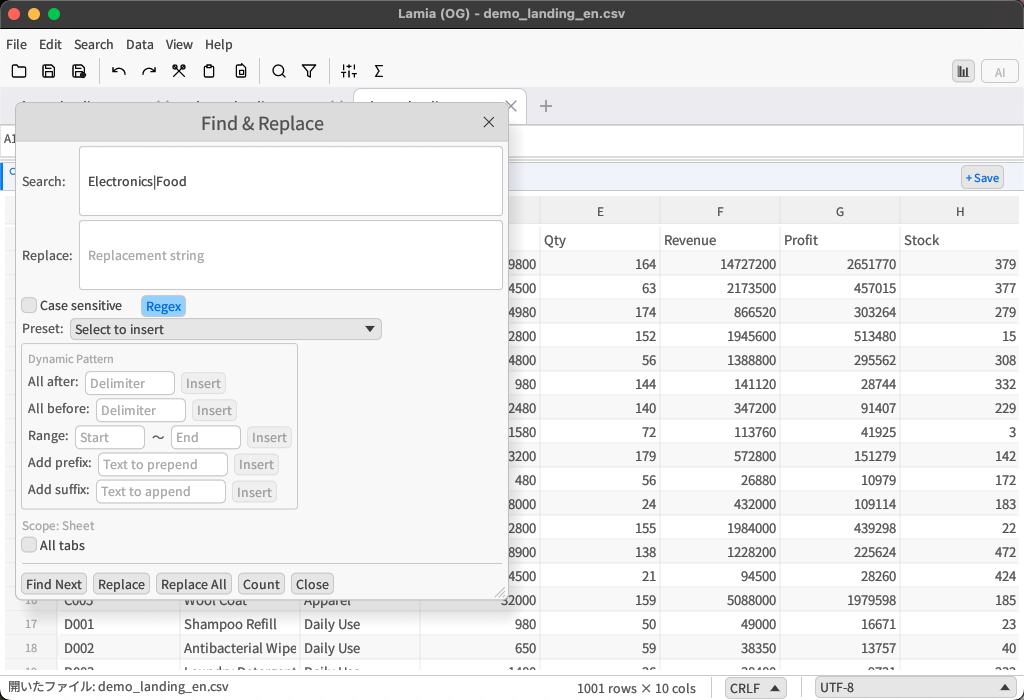
  • 正規表現検索置換: 複雑なパターンマッチと一括置換(13種プリセット付き)
  • Regex search & replace: Complex pattern matching with 13 presets
  • 重複削除: 複数キー列で重複判定、プレビュー確認後に実行
  • Deduplication: Multi-key detection with preview before execution
Lamia オートフィルターパネル Lamia autofilter panel

Japanese

レガシーCSVも、BOM付きも、
すべてそのまま開ける。
Open Any CSV —
Legacy, BOM, or Standard.

  • 自動エンコーディング判定: UTF-8 BOM / UTF-8 / Shift-JIS(CP932)を自動識別
  • Auto encoding detection: Identifies UTF-8 BOM / UTF-8 / Shift-JIS (CP932)
  • 手動切り替え: 判定が外れた場合もツールバーから即変更
  • Manual override: Change encoding from the toolbar if auto-detect is wrong
  • RFC 4180準拠: 改行を含むセルは自動でダブルクォート囲み
  • RFC 4180 compliant: Cells with newlines are auto-wrapped in quotes
  • 数式入力(= キー)時にIMEを自動でASCIIモードへ切り替え
  • IME auto-switches to ASCII mode when entering formulas (= key)
Lamia 検索置換(正規表現) Lamia search and replace (regex)

Clipboard

貼り付けも、
思い通りに。
Paste Exactly
How You Want.

操作Action ショートカットShortcut 内容Description
通常貼り付けStandard paste Ctrl+V セル値・数式をそのまま貼り付けPastes values and formulas as-is
値のみ貼り付けValues only Ctrl+Shift+V 数式を展開した値だけ貼り付けPastes evaluated values without formulas
空白セルへ貼り付けEmpty cells only Ctrl+Alt+V 空白セルのみ上書き、既存データを保護Overwrites only empty cells, preserving existing data
Lamia ソートダイアログ Lamia sort dialog

More Features

プロの作業を支える、
高度な機能群。
Advanced Tools for
Professional Work.

📐

数式・クロスタブ参照 Formulas & Cross-tab

数式バー画面 Formula bar
  • =SUM(A1:A10) など Excel互換の60以上の関数
  • =SUM(A1:A10) and 60+ Excel-compatible functions
  • ='Sheet2.csv'!A1 でタブをまたいだ参照が可能
  • ='Sheet2.csv'!A1 for cross-tab references
  • F4キーで参照形式を切り替え(A1 → $A$1 → A$1 → $A1)
  • F4 to cycle reference types (A1 → $A$1 → A$1 → $A1)
🔒

自動バックアップ Auto Backup

自動バックアップブラウザ Auto backup browser
  • ファイルを開いたとき・保存したときに自動でgzip圧縮バックアップを作成
  • Auto gzip-compressed backup on open and on save
  • 12ファイル × 最大6バージョンを保持(最大72世代)
  • 12 files × up to 6 versions retained (up to 72 generations)
  • 無料版から利用可能
  • Available in the free Lite version
🔗

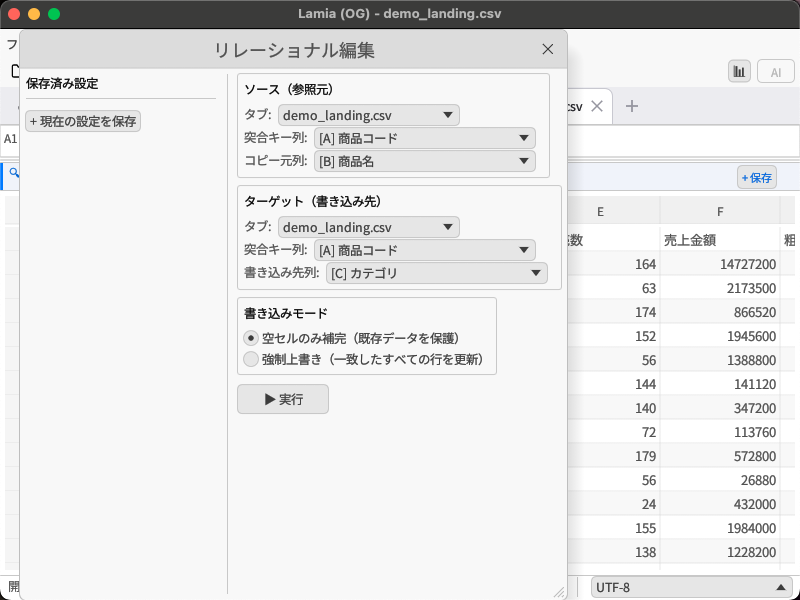
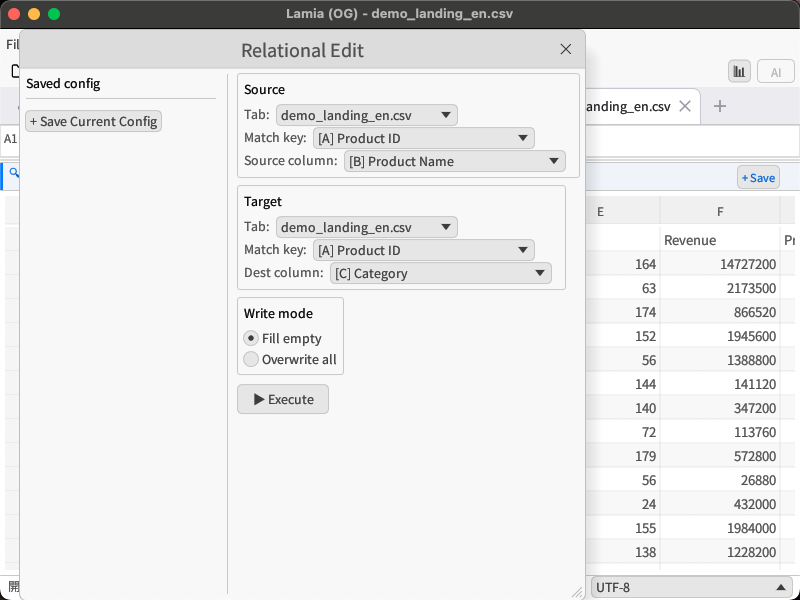
リレーショナル編集 Relational Editing

リレーショナル編集モーダル Relational editing modal
  • 2つのタブをキー列で突き合わせて値を転記
  • Match two tabs by key column and transfer values
  • ExcelのVLOOKUP相当の処理をノーコードで実行
  • VLOOKUP-equivalent operation, no code required
  • 書き込みモード: 強制上書き / 空セルのみ補完
  • Write modes: Force overwrite / Fill empty cells only
⚙️

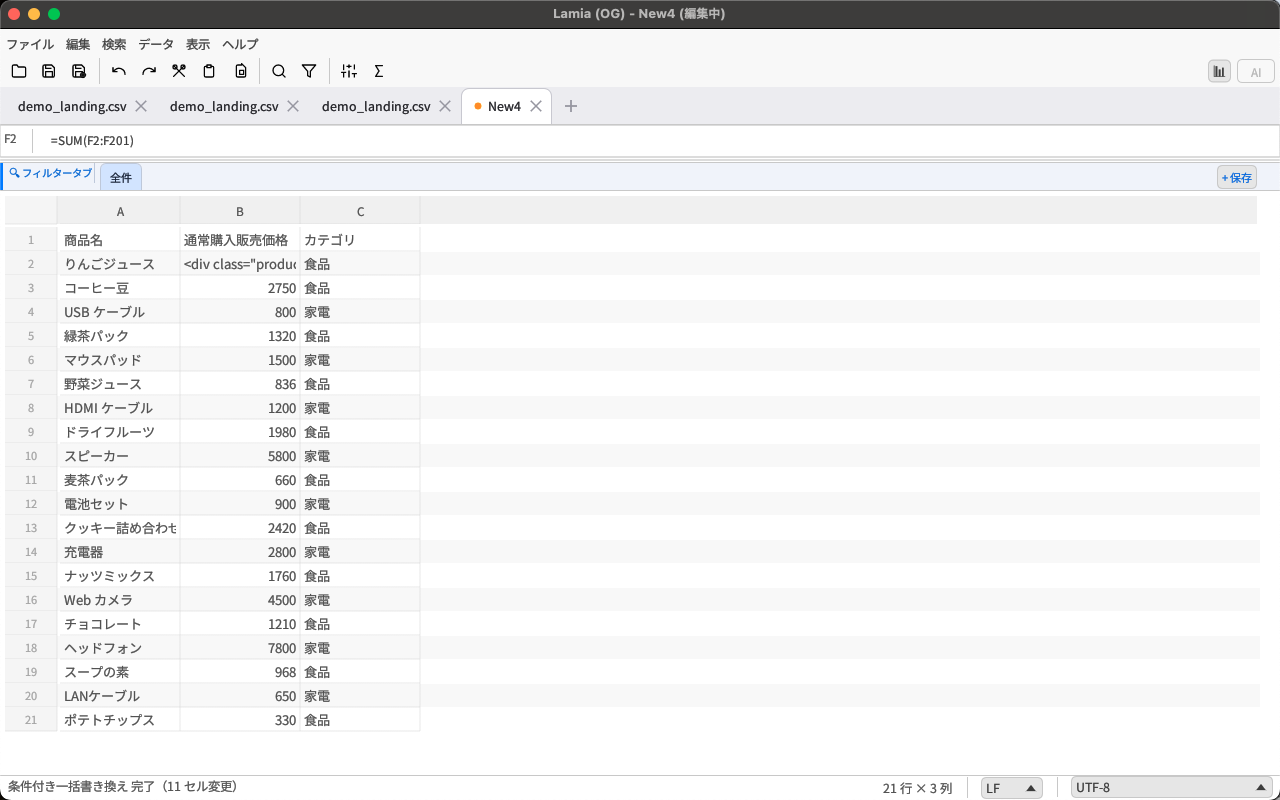
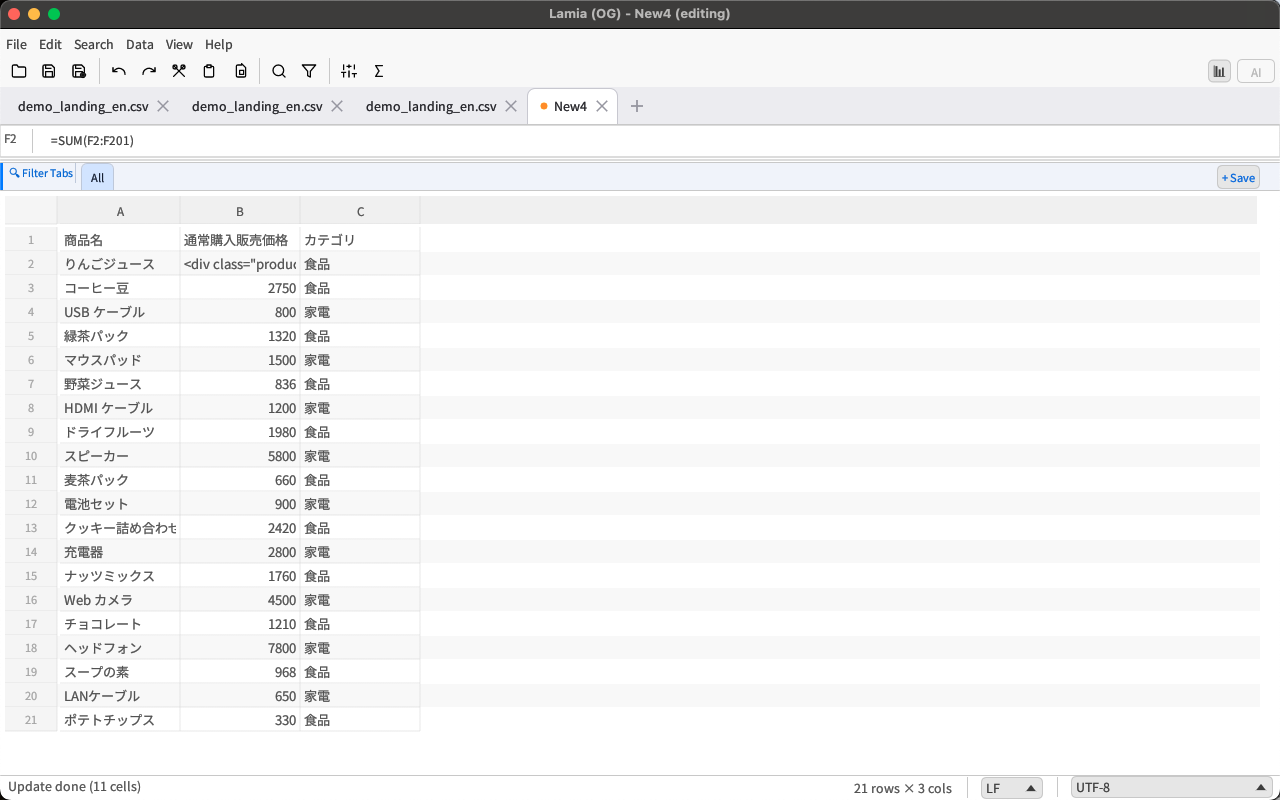
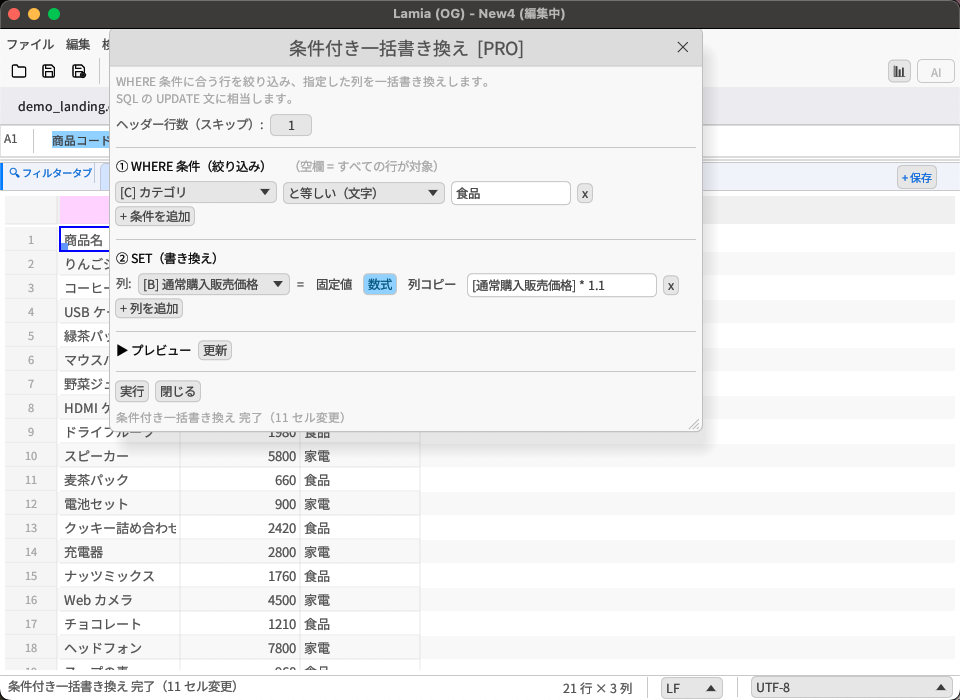
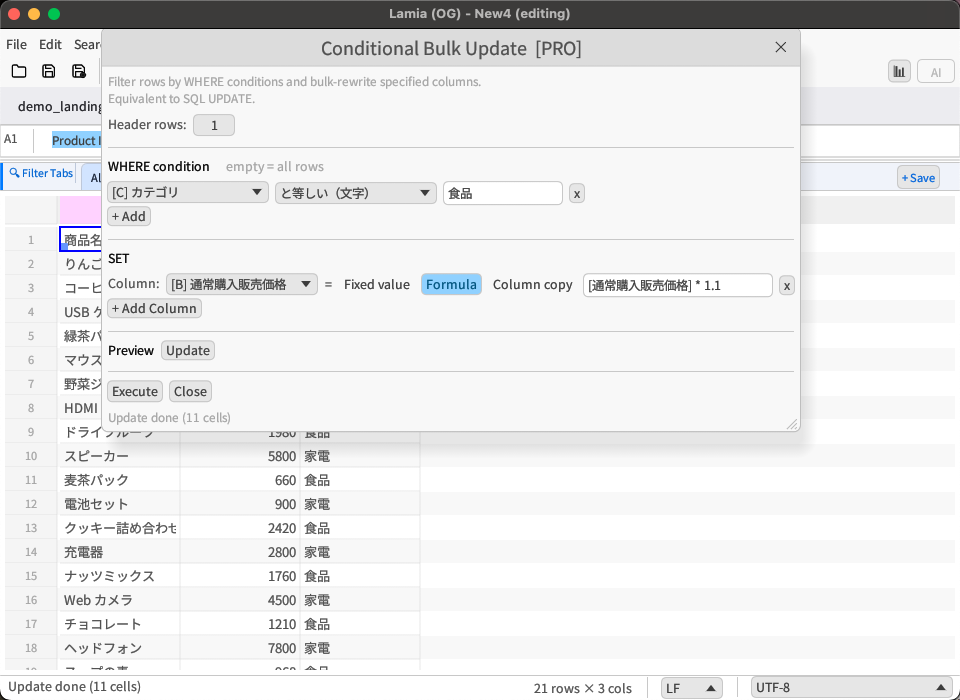
条件付き一括書き換え Conditional Bulk Update PRO

条件付き一括書き換えモーダル Conditional bulk update modal
  • SQL の UPDATE…WHERE に相当する一括書き換えをGUIで設定
  • SQL UPDATE…WHERE equivalent — set up visually in GUI
  • 実行前に最大50件の差分をプレビュー確認。Undoで元に戻せる
  • Preview up to 50 changes before execution. Undoable.
✏️

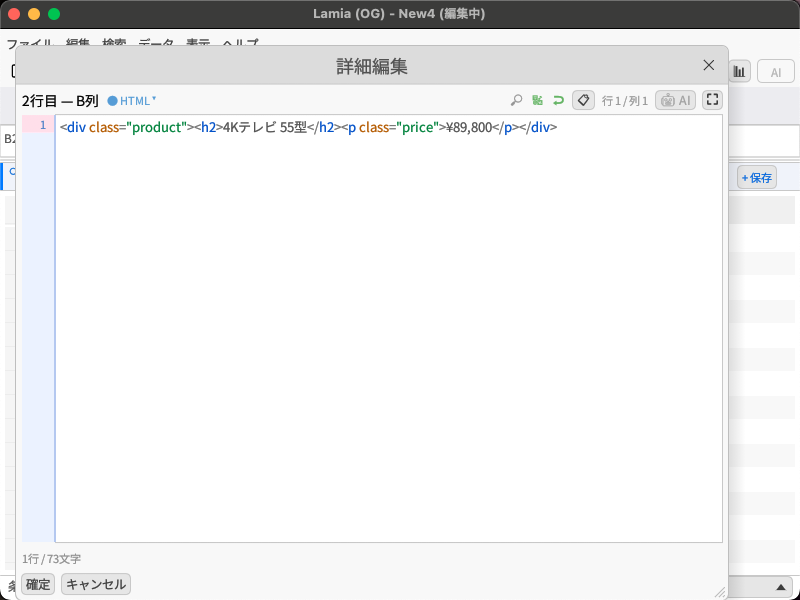
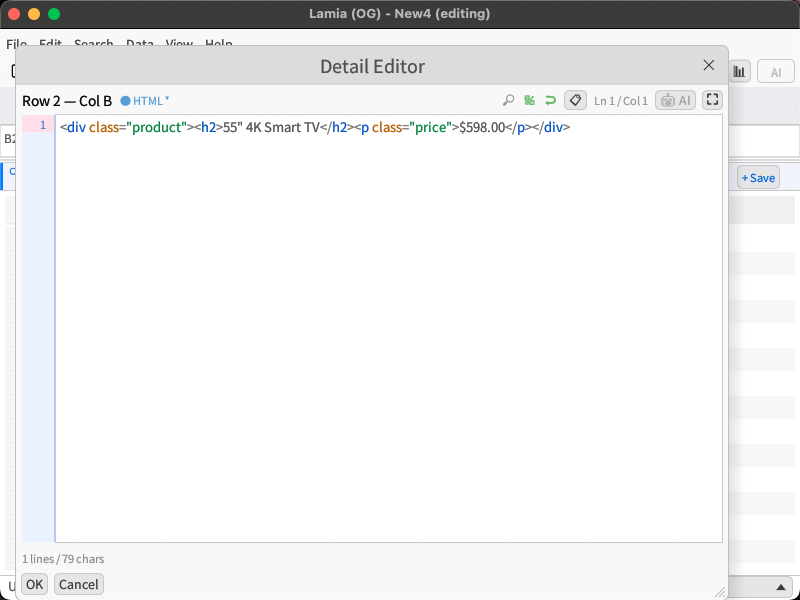
セル詳細編集 Cell Detail Editor

セル詳細編集モーダル Cell detail editor modal
  • HTMLシンタックスハイライト: タグ・属性・テキストを色分け表示
  • HTML syntax highlight: Tags, attributes, and text color-coded
  • Emmet省略記法: div.foo>ul>li*3 を一発展開
  • Emmet: Expand div.foo>ul>li*3 with one keystroke
🖨️

印刷・PDF出力 Print & PDF Export

  • ネイティブ印刷ダイアログ対応
  • Native print dialog support
  • 複数行セル(改行あり)もPDFで正しくレンダリング
  • Multi-line cells render correctly in PDF
  • 日本語フォント埋め込み対応
  • Japanese font embedding supported

Compare

なぜ Lamia を選ぶのか。 Why Choose Lamia?

※ 競合ツールは名称を伏せて表記しています。E=Windows超大容量特化、M=クロスプラットフォーム有料直販、T=OSSクロスプラットフォーム、EC=Macネイティブストア専売 Competitor tools are shown anonymously. E=Windows large-data, M=cross-platform paid, T=OSS cross-platform, EC=Mac-native store

機能Feature Lamia EMTEC
Mac 対応Mac support
Windows 対応Windows support
App Store / MS Store 配信App / MS Store ✅ 両方✅ Both MSのみMS only MacのみMac only
1,000万行の編集10M-row editing ✅ 有料のみ✅ paid only 読込のみread-only 15M行15M rows 非公表undisclosed
AI チャット統合AI chat ✅ Pro
列統計パネルColumn stats panel ✅ Pro ✅ 有料✅ paid ✅ 有料✅ paid
SQL クエリSQL query ✅ 有料✅ paid
Shift-JIS 自動判定Shift-JIS auto-detect
重複削除Deduplication
週複数回の更新Frequent updates
無料版ありFree tier 制限付limited 制限付limited 全機能all

Lamia だけが持つ唯一の組み合わせ Only Lamia offers this combination

Mac App Store + Microsoft Store の両方で配信
      +
10M行を「編集」できる(読み込み専用ではない)
      +
AI チャット(ChatGPT / Claude / Gemini)をアプリ内で利用可能
Available on both Mac App Store + Microsoft Store
      +
Edit 10M+ rows (not read-only)
      +
Built-in AI chat (ChatGPT / Claude / Gemini)
  • Mツール・Tツール はストア外の直接ダウンロードのみ
  • M, T tools are direct downloads only — no app store
  • EツールはWindows専用、ECツールはMac専用
  • E tool is Windows-only; EC tool is Mac-only
  • AI機能を持つCSVエディターは2026年6月時点で Lamia のみ
  • As of June 2026, Lamia is the only CSV editor with built-in AI chat

Pricing

シンプルな料金体系 Simple Pricing

基本機能はすべて無料。大規模業務にはPROへ。 All core features are free. Go PRO for large-scale work.

Lite

無料 Free

Microsoft Store でダウンロード Download on Microsoft Store
  • ✓ ファイル保存: 行数制限なし
  • ✓ File save: No row limit
  • ✓ Undo / Redo: 5段階
  • ✓ Undo / Redo: 5 levels
  • ✓ 基本編集機能すべて(ソート・フィルター・数式・検索置換)
  • ✓ All basic editing (sort, filter, formulas, search & replace)
  • ✓ AIチャットパネル
  • ✓ AI chat panel
  • ✓ 自動バックアップ
  • ✓ Auto backup
  • ✓ リレーショナル編集
  • ✓ Relational editing
  • ✓ クリーニングパイプライン
  • ✓ Cleaning pipeline
  • — フィルター保存ビュー(1件まで)
  • — Filter saved views (1 view)
  • — 条件付き一括書き換え(プレビューまで)
  • — Conditional bulk update (preview only)
  • — ブロック型ソート・重複削除
  • — Block-type sort & deduplication
  • — Column Explorer・スパークチャート他
  • — Column Explorer, sparkcharts & more
  • — SQLコネクタ
  • — SQL Connector

おすすめ Recommended

PRO

アプリ内購入 In-App Purchase

PROにアップグレード Upgrade to PRO
  • ✓ ファイル保存: 無制限
  • ✓ File save: Unlimited
  • ✓ Undo / Redo: 1,000段階
  • ✓ Undo / Redo: 1,000 levels
  • ✓ 基本編集機能すべて
  • ✓ All basic editing features
  • ✓ AIチャットパネル
  • ✓ AI chat panel
  • ✓ 自動バックアップ
  • ✓ Auto backup
  • ✓ リレーショナル編集
  • ✓ Relational editing
  • ✓ フィルター保存ビュー(無制限)
  • ✓ Filter saved views (unlimited)
  • ✓ 条件付き一括書き換え(実行)
  • ✓ Conditional bulk update (execute)
  • ✓ ブロック型ソート
  • ✓ Block-type sort
  • ✓ ブロック型重複削除
  • ✓ Block-type deduplication
  • ✓ Column Explorer(列統計パネル)
  • ✓ Column Explorer (stats panel)
  • ✓ インラインスパークチャート
  • ✓ Inline sparkcharts
  • ✓ Pivot / Unpivot
  • ✓ Pivot / Unpivot
  • ✓ CSV差分・マージ
  • ✓ CSV diff & merge
  • ✓ セル内パターン集計
  • ✓ In-cell pattern aggregation
  • ✓ SQLコネクタ(外部DBに直接クエリ)
  • ✓ SQL Connector (query external DBs directly)

LiteからPROはアプリ内購入でいつでもアップグレード可能。 Upgrade from Lite to PRO anytime via in-app purchase.

Spec

技術仕様 Specifications

対応OSSupported OS Windows 10 / 11 (x64)
macOS — 近日公開 macOS — Coming Soon
Ubuntu — 近日公開 Ubuntu — Coming Soon
言語Built With Rust + egui(ネイティブレンダリング)
対応エンコーディングEncodings UTF-8, UTF-8 BOM, Shift-JIS (CP932)
最大行数Max Rows 1,000万行以上(仮想スクロール) 10M+ rows (virtual scroll)
Undo段階Undo Levels 5段階(Lite)/ 1,000段階(PRO) 5 levels (Lite) / 1,000 levels (PRO)
対応関数Functions 60以上(Excel互換)+ 正規表現独自関数 60+ (Excel-compatible) + custom regex functions
AIプロバイダーAI Providers ChatGPT (gpt-4o) / Claude (claude-opus-4-5) / Gemini (gemini-2.0-flash)
自動バックアップAuto Backup 12ファイル × 最大6バージョン(gzip圧縮) 12 files × up to 6 versions (gzip compressed)
価格Pricing 無料 + アプリ内PRO購入 Free + in-app PRO upgrade

FAQ

よくある質問 Frequently Asked Questions

Excelの代わりに使えますか? Can it replace Excel?

CSV編集に特化したアプリです。Excelの代替というよりも、CSVファイルを高速・正確に扱うための専門ツールです。数式・ソート・フィルター・AI分析を備えており、CSV業務に必要な操作はほぼすべてカバーしています。

Lamia is a CSV-first tool, not an Excel replacement. It handles CSV files fast and accurately — with formulas, sort, filter, and AI analysis — covering virtually everything you need for CSV work.

日本語(Shift-JIS)のCSVは開けますか? Can it open Japanese (Shift-JIS) CSV files?

はい。自動エンコーディング判定でShift-JISを正しく識別します。読み込み時も保存時も文字化けしません。

Yes. Auto encoding detection correctly identifies Shift-JIS. No garbled characters on read or save.

1,000万行のCSVは本当に開けますか? Can it really open a 10M-row CSV?

仮想スクロール技術により、表示に必要な行だけをレンダリングするため、大規模ファイルでも動作が重くなりません。実際に10M行以上のファイルでの動作を想定した設計です。

Virtual scroll technology renders only the visible rows, so large files stay fast. The app is designed specifically for 10M+ row files.

AIチャットを使うには別途APIキーが必要ですか? Do I need an API key for AI chat?

はい。ChatGPT・Claude・GeminiそれぞれのAPIキーを設定画面に入力する必要があります。

Yes. You'll need to enter your API key (OpenAI / Anthropic / Google) in the settings screen.

間違えて上書き保存してしまったら? What if I accidentally overwrite a file?

自動バックアップ機能があります。「ファイル」→「自動バックアップ…」から過去のバージョンを参照して復元できます。無料版でも利用可能です。

Auto Backup has you covered. Go to File → Auto Backup… to browse and restore previous versions. Available in the free Lite version.

Lite版とPRO版の違いは何ですか? What's the difference between Lite and PRO?

主な違いは「Undoの段階数(5 vs 1,000)」と「ブロック型ソート・重複削除・条件付き一括書き換えの実行(Pro限定)」です。ファイル保存の行数制限はなく、基本的な編集・AI・数式・バックアップ機能はLiteでも利用できます。

The main difference is undo levels (5 vs 1,000) and PRO-only features: block-type sort, deduplication, and conditional bulk update execution. There is no row limit on file saves, and basic editing, AI, formulas, and backup are all available in Lite.